



We were three minutes into a quick website scan for a prospect when we noticed something odd. We checked again. Then we ran a full audit just to be sure.
Zero H1 tags on any page throughout the entire site. Not buried or mislabeled, just…absent.
In case you aren’t a website developer or SEO guru, an H1 is an HTML “heading” tag that should be used for the main headline of a webpage. Between the meta description and this H1 tag, these are the things that search engines and AI crawlers look at first to identify what each web page is actually about.
This prospect’s site didn’t have an H1 tag on any page.
A human visitor wouldn’t notice. The branding was clean, the copy read fine, the layout made sense. But a crawler reading raw HTML doesn’t see branding or layout. It sees structure. And on this site, the structure was telling it nothing.
These missing technical bits are silently blocking every bot that swings by, and most CEOs have no idea.
Your website might look complete to every person who visits it and still be functionally invisible to the AI systems now doing a meaningful share of the discovery and evaluation work before a buyer ever reaches out.
The Mechanism, Stated Plainly
Google sees your site the way a visitor does. Googlebot renders all the code (JavaScript, HTML, etc.), builds the page the same way a browser would, and reads the result.
Most AI crawlers don’t do that. Back in late 2024, Vercel, a web infrastructure platform, and MERJ, a technical SEO firm, monitored real crawler traffic across hundreds of production sites and found that none of the major AI crawlers, including GPTBot (OpenAI’s crawler) and ClaudeBot (Anthropic’s crawler), render JavaScript.
They’re just looking for the words on the page. No rendering step.
If your content, navigation, or core identity signals only exist after JavaScript executes, these systems are working from a page that doesn’t match what a human sees. Sometimes a page that’s close to empty.
For most sites, this isn’t a five-alarm fire. The exposure concentrates in newer AI-generated website/app builders and JavaScript-heavy frameworks, where a meaningful share of what a visitor sees doesn’t exist until the browser builds it.
The Common Culprits
What matters in AI crawler visibility is how your site renders and what the bots actually see once it arrives. These are the five technical issues our Website Diagnostics run into most often, ranging from the obvious to the one almost nobody thinks to check.
1. Webpage Identity
If a page has no H1, or the H1 doesn’t say what the page is about, a crawler is left guessing at the most basic question it can ask: what is this. The site we audited failed that test everywhere. It’s missing the answer to the first question any reader, human or machine, asks of a page.
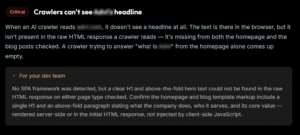
There’s an additional layer to this as well. Your H1 headline should have narrative consistency with your meta description. These two HTML elements support each other and reinforce that answer for AI crawlers.
2. Code Rendering
Next, the broader rendering problem. Sites built on Javascript frameworks like React, Vue, or heavy page-builder platforms often load core content client-side. The content exists. It just doesn’t exist yet when a non-rendering crawler (AI bots) reads the page.
3. Animation-Gated Content
You know those cool animation effects you’ve added to your page? Some of them are blocking your content. Scroll-triggered fade-ins, carousels, reveal-on-scroll effects, anything designed to make a page feel alive as a visitor moves down it.
The text is technically present within the code of your page. But if it depends on a JavaScript event firing to display, a crawler reading raw HTML may never see it rendered as legible content.
Most CEOs can picture a JavaScript problem in the abstract. Almost none picture their own homepage’s fade-in effect as the blocker.
4. Code Bloat
A polished-looking site often carries a lot of behind-the-scenes formatting instructions, the code that controls fonts, spacing, colors, and layout. That formatting can outweigh the actual words on the page many times over, and that’s completely normal. It’s not a sign anything’s wrong.
There’s a rough threshold worth knowing. Industry site-auditing tools generally flag a page once visible text drops to 10% or less of the total page code, a signal that formatting may be crowding out content rather than just supporting it.
What matters is whether that formatting is burying the content a crawler needs to find. Confuse formatting weight with content weight and teams jump to a full redesign, when the actual fix is much smaller: optimize your code so it’s not crowding the content, and leave the rest alone.
5. Missing Structured Data (Schema)
Even a site with no rendering problem can still describe itself poorly. Structured data, also called schema markup, is a behind-the-scenes summary that tells search bots and AI crawlers exactly who you serve, what you do, and where.
When that summary is thin, you’re underselling what’s actually on the page. A site might mention specific team members, branded products, named services, and the regions it covers right in the body copy, and still leave all of that out of its schema.
What matters here is accuracy, not just AI crawler visibility. A site that renders cleanly but hands AI systems an incomplete or generic summary runs into the same problem as an invisible one. The consequences just show up further downstream, when an AI system describes your company inaccurately to a buyer you’ll never meet.
Why This Matters Now
Every site we’ve diagnosed has turned up some sort of technical issue. Thin schema has been the most common finding. On one site, we found a text-to-HTML ratio so lopsided that its content is literally buried under its own code.
The issues vary, but the underlying problem is the same: nobody had looked at the site through an AI crawler’s eyes before. A site can look complete to the team that built it and still look like a fraction of itself to the systems now responsible for how buyers find and evaluate vendors.
The fix isn’t usually a rebuild. It’s mostly targeted optimizations, once you know exactly what’s blocking performance.
That’s the value of a Website Diagnostic: it tells you whether a crawler reading your site sees what your visitors see, or sees something thinner, gated, or quietly inaccurate.
If you’re not sure what an AI system currently sees when it reads your site, that’s exactly the kind of structural gap an AI360 Snapshot surfaces. Worth knowing before it costs you a deal you never knew you were in the running for.
Common Questions
Why can’t AI crawlers see everything on my website?
Most AI crawlers, including GPTBot and ClaudeBot, don’t render JavaScript the way Google does. They read raw HTML, so if your content, navigation, or identity signals only appear after the browser executes code, these systems may be working from a page that’s functionally empty.
How do I know if my website is invisible to AI search tools?
The only way to know is to check what a crawler actually sees when it reads your raw HTML, not what a visitor sees in a browser. A Website Diagnostic compares the two and flags exactly where they diverge.
